Activity 11: Research Angular Directives
1.Angular Directives
Angular directives are a powerful feature in Angular that enable you to extend HTML's capabilities by manipulating the DOM. Directives allow you to create reusable components, dynamically alter the structure of the DOM, and apply custom behaviors and styles to elements.
Types of Angular Directives
A. Component Directives
Definition: Component directives are the most common type of directive in Angular. They define a component that has its own view and logic. Every Angular component is technically a directive with a template.
Use Case: Use component directives to encapsulate reusable logic and UI elements. For example, you can create custom form components or navigation menus.
Code Example:
import { Component } from '@angular/core';

@Component({
  selector: 'app-user-profile',
  template: `<h1>{{name}}</h1>`,
})
export class UserProfileComponent {
  name: string = 'John Doe';
}
Explanation: In this example, UserProfileComponent is a component directive that displays a user's name. The selector defines the component's HTML tag, and the template specifies the view.
B. Structural Directives
Definition: Structural directives change the structure of the DOM by adding or removing elements based on certain conditions. They are prefixed with an asterisk (*) in the template syntax.
Use Case:
*ngIf: Conditionally include or exclude elements.*ngFor: Repeat elements for each item in a collection.
Code Example:
*ngIf:<div *ngIf="isLoggedIn"> Welcome back, user! </div>Explanation: This snippet shows the
divelement only if theisLoggedInvariable istrue.*ngFor:<ul> <li *ngFor="let item of items">{{ item }}</li> </ul>Explanation: This snippet iterates over the
itemsarray and creates a list item for each element.
C. Attribute Directives
Definition: Attribute directives alter the appearance or behavior of an element, component, or other directives. They are used to add or modify attributes on HTML elements.
Use Case:
ngClass: Dynamically add or remove CSS classes based on conditions.ngStyle: Apply dynamic inline styles to elements.
Code Example:
ngClass:<button [ngClass]="{ 'active': isActive }">Click me</button>Explanation: The button element will receive the
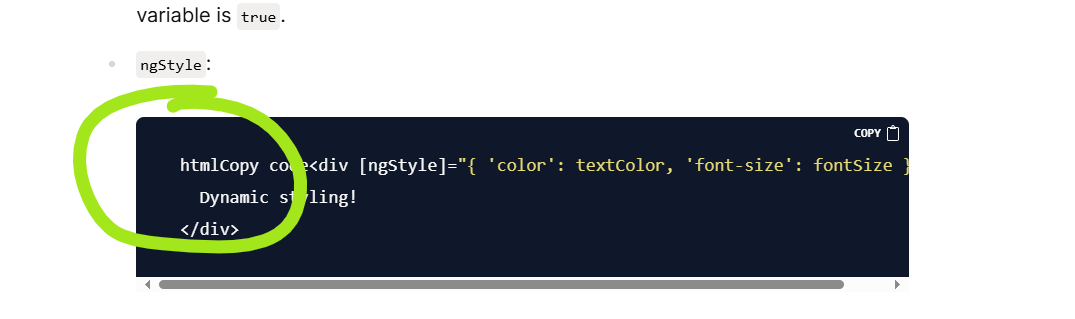
activeclass when theisActivevariable istrue.ngStyle:htmlCopy code<div [ngStyle]="{ 'color': textColor, 'font-size': fontSize }"> Dynamic styling! </div>Explanation: This snippet dynamically sets the
colorandfont-sizestyles based on component properties.
2.Use Cases of Angular Directives:
1. Component Directives
Use Case: Component directives are used to encapsulate reusable UI elements and logic, which promotes modularity and reusability in your Angular applications.
Examples:
Custom Form Controls: Create reusable form controls like custom date pickers or input fields with validation.
// date-picker.component.ts import { Component } from '@angular/core'; @Component({ selector: 'app-date-picker', template: `<input [ngModel]="date" (ngModelChange)="onDateChange($event)" type="date">`, }) export class DatePickerComponent { date: string; onDateChange(newDate: string) { this.date = newDate; // Emit or handle the new date value } }Navigation Menu: Build a reusable navigation menu component.
// navigation-menu.component.ts import { Component } from '@angular/core'; @Component({ selector: 'app-navigation-menu', template: ` <ul> <li><a [routerLink]="['/home']">Home</a></li> <li><a [routerLink]="['/about']">About</a></li> <li><a [routerLink]="['/contact']">Contact</a></li> </ul> `, }) export class NavigationMenuComponent {}
2. Structural Directives
Use Case: Structural directives modify the structure of the DOM based on conditions or iterations. They are essential for handling dynamic content and layouts.
Examples:
Conditional Rendering with
*ngIf: Show or hide elements based on user authentication status.<!-- app.component.html --> <div *ngIf="isLoggedIn; else loginPrompt"> <h1>Welcome back, user!</h1> </div> <ng-template #loginPrompt> <h1>Please log in</h1> </ng-template>Enhancement: Allows for dynamic display of content based on user state.
Dynamic Lists with
*ngFor: Render a list of items such as products or tasks.<!-- app.component.html --> <ul> <li *ngFor="let product of products">{{ product.name }} - ${{ product.price }}</li> </ul>Enhancement: Automatically generates list items for each product in the
productsarray.Switching Content with
*ngSwitch: Display different content based on user role or application state.<!-- app.component.html --> <div [ngSwitch]="userRole"> <div *ngSwitchCase="'admin'">Welcome, Admin!</div> <div *ngSwitchCase="'user'">Welcome, User!</div> <div *ngSwitchDefault>Welcome, Guest!</div> </div>Enhancement: Enables different content rendering based on conditions.
3. Attribute Directives
Use Case: Attribute directives are used to modify the appearance or behavior of DOM elements without changing their structure. They are perfect for adding dynamic styles or class bindings.
Examples:
Dynamic Class Binding with
ngClass: Apply different styles based on component state.<!-- app.component.html --> <button [ngClass]="{ 'active': isActive, 'disabled': isDisabled }">Click me</button>Enhancement: Dynamically alters the button's appearance based on conditions.
Dynamic Style Binding with
ngStyle: Apply inline styles that can change in response to component data.<!-- app.component.html --> <div [ngStyle]="{ 'background-color': backgroundColor, 'font-size': fontSize + 'px' }"> Styled content! </div>Enhancement: Allows for real-time style changes based on component properties.
Summary
Component Directives: Facilitate the creation of reusable and modular UI elements, enhancing the maintainability and scalability of Angular applications.
Structural Directives: Provide powerful tools for dynamically changing the DOM structure, making it easier to handle varying content and layouts.
Attribute Directives: Offer fine-grained control over the styling and behavior of elements, improving the responsiveness and interactivity of the UI.
3.Search for Code Snippets:
1. Conditional Rendering with *ngIf
Purpose: Conditionally render elements based on a boolean condition.
Code Snippet:
<!-- app.component.html -->
<div *ngIf="isLoggedIn; else loginPrompt">
<h1>Welcome back, user!</h1>
</div>
<ng-template #loginPrompt>
<h1>Please log in</h1>
</ng-template>
Explanation:
The
*ngIfdirective displays the welcome message ifisLoggedInistrue.If
isLoggedInisfalse, the content inside the<ng-template>with the#loginPrompttemplate reference is displayed instead.
2. Looping with *ngFor
Purpose: Repeat elements for each item in an array or collection.
Code Snippet:
<!-- app.component.html -->
  <ul>
    <li *ngFor="let item of items">{{ item }}</li>
  </ul>
Explanation:
The
*ngFordirective iterates over theitemsarray and creates a list item (<li>) for each element in the array.The
let item of itemssyntax binds each element of theitemsarray to theitemvariable in each iteration.
3. Dynamic Class Binding with ngClass
Purpose: Dynamically add or remove CSS classes based on conditions.
Code Snippet:
<!-- app.component.html -->
<button [ngClass]="{ 'active': isActive, 'disabled': isDisabled }">
Click me
</button>
Explanation:
The
ngClassdirective conditionally applies theactiveclass whenisActiveistrueand thedisabledclass whenisDisabledistrue.Classes are applied based on the truthiness of the conditions.
4. Dynamic Style Binding with ngStyle
Purpose: Apply inline styles dynamically based on component properties.
Code Snippet:
<!-- app.component.html -->
<div [ngStyle]="{ 'color': textColor, 'font-size': fontSize }">
Dynamic styling!
</div>
Explanation:
- The
ngStyledirective sets thecolorandfont-sizestyles of thedivelement based on thetextColorandfontSizeproperties from the component class.
5. Using *ngSwitch for Conditional Rendering
Purpose: Display different content based on a switch expression.
Code Snippet:
  <!-- app.component.html -->
  <div [ngSwitch]="userRole">
    <div *ngSwitchCase="'admin'">Welcome, Admin!</div>
    <div *ngSwitchCase="'user'">Welcome, User!</div>
    <div *ngSwitchDefault>Welcome, Guest!</div>
  </div>
Explanation:
The
*ngSwitchdirective allows conditional rendering based on the value ofuserRole.*ngSwitchCasedisplays content for specific values (e.g.,'admin'or'user').*ngSwitchDefaultprovides a fallback option when none of the cases match.
Summary
These snippets cover common use cases for Angular directives, including conditional rendering, looping, dynamic class binding, and styling. Each snippet is designed to be easy to understand and apply, showcasing how Angular directives can be used effectively in various scenarios.
References
Official Angular Documentation:
Angular Directives Overview - This page provides a comprehensive overview of built-in directives in Angular.
Angular Structural Directives - Details about how structural directives like
*ngIf,*ngFor, and*ngSwitchwork.Angular Attribute Directives - Information on how to create and use attribute directives like
ngClassandngStyle.
Tutorials and Guides:
Angular Directives Tutorial - A blog post that explains Angular directives with examples.
Angular ngClass and ngStyle Examples - Examples and explanations for using
ngClassandngStylein Angular applications.
Code Examples:
- Angular Examples on StackBlitz - A platform where you can find live examples and experiment with Angular code, including directives.
Further Reading
Angular - Tour of Heroes Tutorial - A step-by-step guide to building an Angular application that includes practical examples of using directives.
Angular Documentation - Directives - Official guide to understanding and creating directives in Angular.